Stop guessing what your AI changed. See the whole story.
Turn Claude Code sessions into interactive timelines connecting every prompt to the code it changed — with diffs, explanations, and the full story.
Generate a self-contained HTML "session story" that links each prompt in a vibe coding session to the file edits it caused, with a review timeline, a GitHub-style diff view, and a plain-language narrative.
Install the skill
One command, through the open skills CLI or as a Claude Code plugin. Nothing to publish or configure, and no npm dependencies at runtime. The skills installer needs Node.js 22.20+ (check with node -v); the skill runs on 18.18+.
On Node older than 22.20, this command fetches Node 22 for the install only and changes nothing else:
Run the same command again to update. Remove it with npx skills remove session-story.
Or install it as a Claude Code plugin. Run this inside Claude Code (2.1.275 or later):
/plugin install session-story --marketplace nalaj/session-story
On older versions, run /plugin marketplace add nalaj/session-story, then /plugin install session-story@session-story. As a plugin, the command is /session-story:session-story. Update with /plugin marketplace update session-story.
Ask for a story
At the end of a session (or in the middle of one), just ask. Claude extracts the transcript, writes the summaries, validates them and opens the page.
/session-storyStory of the current session, saved to the project's .session-stories/ library
Make a story of this session so my teammate can review the changes.Same flow; triggers the skill without the slash command
Turn this session into a pull request description.Markdown export of the same story, ready for gh pr create --body-file -
Write a handoff so a fresh session can pick this up.Where things stand, turn by turn, with the git state
One page, four readers
Switch views to suit who's reading. Everything is inline (CSS, JS and data), so the page works straight from file:// or as an email attachment.
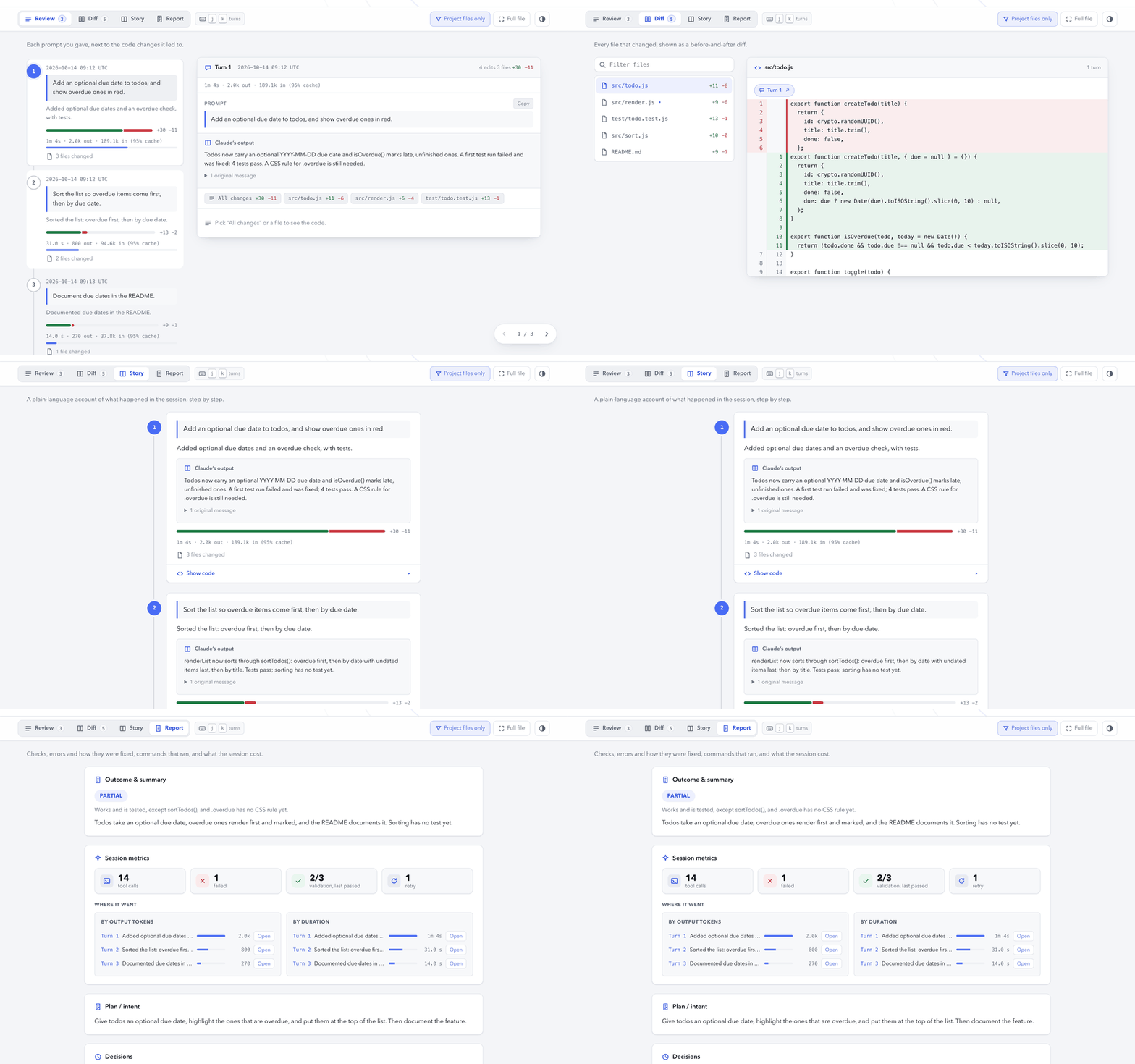
Review
A timeline of turns: the prompt, a one-sentence intent, Claude's answer, and the code behind it, with time and tokens for each turn.
Diff
A GitHub-style file tree and diff, with every hunk tagged with the turn that produced it.
Story
A narrative card per turn, in plain language, with the code folded away.
Report
Outcome, plan, commands, tests, errors and how they were fixed, decisions, git state, and where the time and tokens went.
How it works
The numbers come from the transcript, never from the model. Claude writes only the prose, and it works from a compact brief rather than the raw transcript.
Parses the transcript (and any subagent transcripts) into typed JSON. It records edits, commands, errors, git state, durations and token usage, and leaves anything unrecorded as null.
Claude writes the title, a one-sentence intent per turn, and the plan, decisions and outcome.
Checks the JSON against the schema, and in strict mode that no summary is missing.
Deterministically compiles one self-contained HTML file and indexes it in the project's session library.
The page contains your prompts, Claude's replies, diffs and commands, word for word. Read it before you share it, since a session can include secrets. Nothing is uploaded: the skill reads local files and makes no network requests.